Active Directory Security Best Practices (2026 Edition) – Enterprise Hardening Guide
🔐 Active Directory Security Best Practices (2026 Edition)
Active Directory
Cyber Security
Windows Server
AD Hardening
🧠 Introduction
Active Directory (AD) is the backbone of enterprise identity systems and the #1 target for attackers. A single misconfiguration can lead to complete domain compromise.

⚠️ If AD is compromised, your entire infrastructure is compromised.
🏗️ Tiered Administration Model


- Tier 0: Domain Controllers, AD, PKI
- Tier 1: Servers & Applications
- Tier 2: Workstations
✔ Prevents lateral movement
✔ Enforces strict access boundaries
🔐 Secure Privileged Accounts
- Use Privileged Access Workstations (PAW)
- Enable Just-In-Time access
- Remove permanent admin rights
- Monitor all privileged activity
🧾 Harden Group Policy
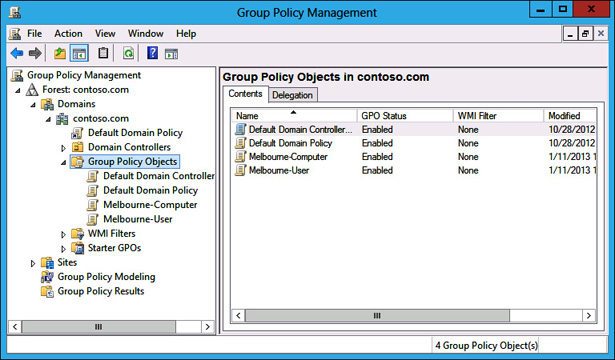

- Strong password policies
- Disable NTLM
- Enable auditing
- Secure GPO permissions
🕵️ Enable Auditing
Important Event IDs: 4624, 4625, Directory Changes
Use SIEM tools like Sentinel or Splunk for monitoring.
🔑 Protect Against Credential Attacks


- Enable LSASS protection
- Disable WDigest
- Use Credential Guard
- Enforce SMB signing
🧬 Secure Kerberos
- Use gMSA accounts
- Rotate passwords automatically
- Monitor SPN usage
🧱 Restrict Permissions
- Audit ACLs
- Remove GenericAll permissions
- Apply least privilege
🧪 Security Assessments
- BloodHound
- PingCastle
- Defender for Identity
🔄 Backup & Recovery


- System State Backups
- Offline backups
- Test restore regularly
🚫 Disable Legacy Protocols
Disable SMBv1, NTLMv1 | Enforce Kerberos & AES
📊 Final Checklist
- ✔ Tier model implemented
- ✔ Privileged access secured
- ✔ GPO hardened
- ✔ Logging enabled
- ✔ Backups tested
🏁 Conclusion
Active Directory security is a continuous process. Implement these best practices to stay protected against modern threats.
🚀 Start securing your AD today before attackers do.
📢 Call to Action
Share this guide with your team and follow for more enterprise IT content.

Comments
Post a Comment